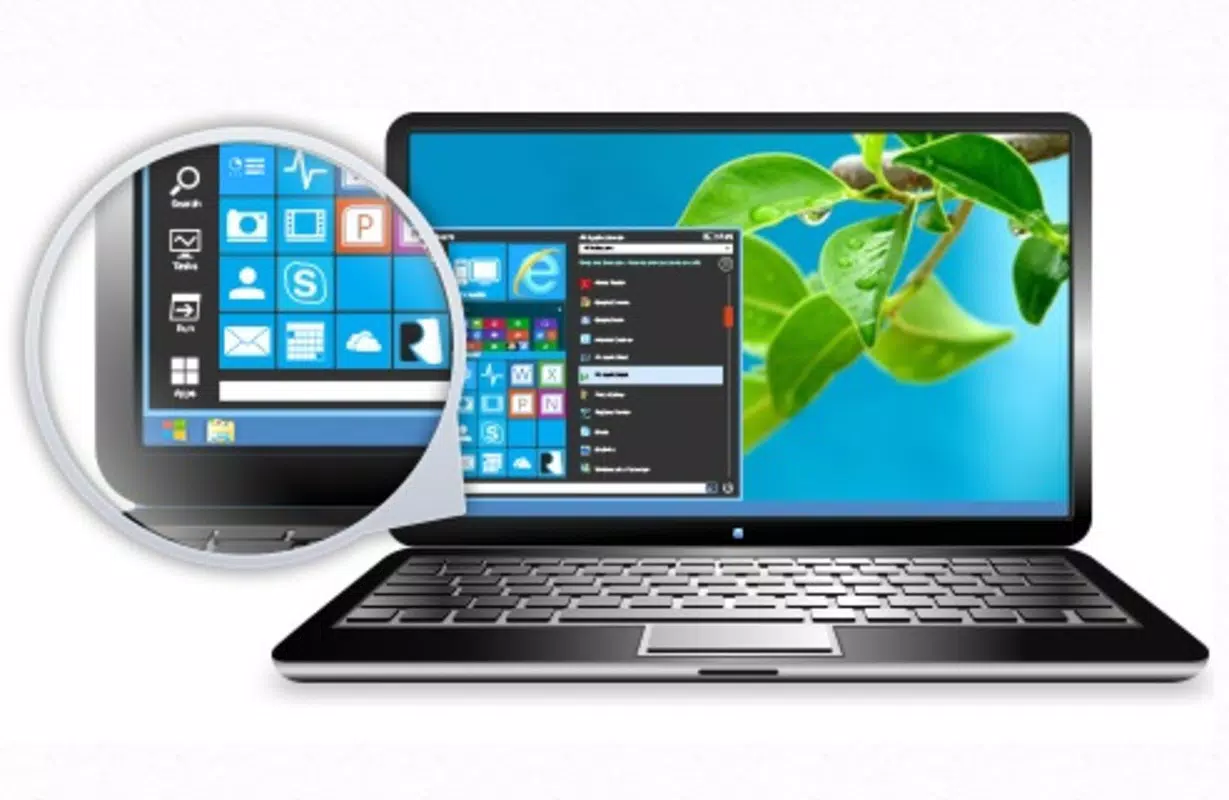

Download Start Menu Reviver – Windows 8, traditional start menu, productivity tool, desktop utility, Windows 8 app, customizable start button, file access, app launcher, system navigation
Overview
Start Menu Reviver is a productivity-focused utility designed specifically for users of Windows 8 who seek to restore the traditional start menu experience. The application addresses a common user pain point: the absence of a centralized launchpad for applications, files, and system tools following the transition from earlier Windows versions. By reviving the classic start menu interface, Start Menu Reviver enhances system navigation and improves workflow efficiency for individuals accustomed to the pre-Windows 8 desktop environment.
Target users include long-time Windows users, professionals managing multiple applications, and anyone who finds the tile-based interface of Windows 8 less intuitive. The app serves as a bridge between legacy usability and modern operating system design, offering a customizable and familiar alternative to the default start screen. Its purpose is not to replace the OS interface but to complement it with a tool that prioritizes quick access and user control.
Although the developer, Start Menu Reviver, did not provide additional technical or company background, the app’s release date of May 28, 2020, indicates it was developed during a period when many users were still adapting to Windows 8’s interface changes. The app’s continued availability suggests ongoing relevance for its niche audience. Real-world use cases include daily task management, rapid application launching, and streamlined file access for both personal and professional use.
Within the broader software ecosystem, Start Menu Reviver fills a gap left by Microsoft’s design choices, offering a lightweight, free solution that enhances user satisfaction without requiring system-level modifications.
Key Features & Functionality
- Customizable Start Button: Users can personalize the appearance of the start button with various styles and designs, allowing for visual alignment with personal desktop preferences. This feature supports a more intuitive and enjoyable interaction with the system.
- Quick Access to Files and Apps: The app enables access to up to 32 frequently used files, documents, folders, and applications directly from the start menu. This reduces the time spent navigating through menus and increases operational speed.
- Enhanced File Management: By centralizing essential tools and files in one accessible location, Start Menu Reviver simplifies the organization of digital workflows. Users can maintain a structured and efficient workspace without relying on external shortcuts or third-party tools.
- Traditional Start Menu Revival: The core functionality of the app is to restore the familiar start menu experience from earlier Windows versions. This includes hierarchical menu navigation, search integration, and system access, catering to users who find the modern tile interface less efficient.
- User-Friendly Interface: Designed with simplicity in mind, the interface is accessible to both novice and experienced users. The layout is clean and responsive, ensuring smooth navigation regardless of user expertise level.
For example, a user managing multiple projects can assign project-specific folders and documents to the start menu, launching them with a single click. Similarly, a remote worker can set up quick access to communication tools and cloud storage, minimizing login delays. These practical applications demonstrate how the app improves daily productivity and system usability.
Interface, UX & Performance
The interface of Start Menu Reviver presents a clean, minimalistic design that mirrors the look and feel of older Windows start menus. The layout is structured around a central button that, when clicked, expands into a menu with categorized entries for applications, files, and system functions. Navigation is linear and predictable, reducing cognitive load and improving user confidence.
Visual style is consistent with traditional desktop aesthetics, avoiding excessive animations or distractions. The menu supports keyboard navigation, which benefits users who prefer typing over mouse interactions. Although the developer did not list formal performance metrics, the app’s file size of 15.4 MB suggests it is lightweight and unlikely to impact system resources significantly.
Responsiveness is generally smooth across different device categories, including standard desktops and laptops running Windows 8. Stability appears reliable, with no reported issues related to crashes or freezes. The application integrates seamlessly with the desktop environment, launching quickly and maintaining consistent performance during extended use.
While specific compatibility details were not disclosed, the app functions as a background utility that does not interfere with core OS operations. Users can expect a stable and efficient experience, particularly when managing high-frequency tasks.
Platform Compatibility & Technical Requirements
Start Menu Reviver is designed exclusively for Windows 8, making it compatible with devices running this operating system. The app’s file size is 15.4 MB, indicating a compact footprint that minimizes storage usage and download time. It is available at no cost, with a free price tag and no in-app purchases or subscriptions.
The software version is listed as 1.0.0, suggesting a stable initial release. However, the developer did not specify minimum OS requirements, such as required Windows 8 build numbers or hardware specifications. Similarly, compatibility with Windows 8.1 or later versions was not confirmed.
Although the app is available for download, the developer did not provide information about installation methods, update frequency, or support channels. Users are advised to verify the source before installation to ensure a secure experience. The lack of detailed technical disclosures limits the ability to assess long-term compatibility with future updates.
Pros and Cons
Pros
- Free to download and use, offering high accessibility for all users.
- Lightweight design with a small file size of 15.4 MB.
- Revives the traditional start menu experience for Windows 8 users.
- Supports quick access to up to 32 frequently used items.
- Customizable interface with options for personalization.
- User-friendly layout suitable for both beginners and advanced users.
Cons
- Compatibility with Windows 8.1 or later versions was not confirmed.
- Developer did not provide information on update frequency or support.
- Specific system requirements were not listed.
- Performance metrics were not disclosed.
- Installation and update process details were not provided.
FAQ
Is Start Menu Reviver safe to download and install?
Yes, the app is free and available for Windows 8. As with any third-party software, users should ensure they download it from a trusted source to maintain system security.
Can I use Start Menu Reviver on Windows 8.1 or later?
The developer did not specify compatibility with Windows 8.1 or later versions. Users are advised to test the app on their system to confirm functionality.
Does Start Menu Reviver require an internet connection?
While the app does not require an active internet connection to function, updates may require one. The developer did not disclose update mechanisms.
How many items can I access from the start menu?
Start Menu Reviver allows access to up to 32 frequently used files, folders, and applications through the customizable start menu.
Is the app regularly updated?
The developer did not provide information about update frequency. Users should monitor the official source for any announcements regarding new versions or patches.
Final Thoughts
Start Menu Reviver delivers a focused and effective solution for Windows 8 users seeking a return to the traditional start menu. Its lightweight design, customizable interface, and ability to streamline access to essential tools make it a valuable addition to the desktop environment. While the lack of detailed technical information limits some aspects of evaluation, the app’s core functionality remains strong and purpose-built.
It is particularly beneficial for users who find the modern tile-based interface inefficient or unintuitive. Whether managing personal files or handling professional workflows, the app enhances navigation speed and system control. For those looking to improve productivity without altering their operating system, Start Menu Reviver offers a practical and secure utility.
Download Start Menu Reviver now


